
Contents
When to adjust or lubricate the tensioner
Before you start
Tools required
Instructions
When to replace the belt
The P3000 drive belt should operate for a long time without needing replacement. However, it can sometimes wear prematurely, especially if the belt and pulleys become misaligned.
The belt should be replaced immediately if it shows signs of wear. Common indicators are:
- The belt slips on the pulleys, and you have already checked the belt tension is correct. If the belt slips, it may present as a noticeable 'thunk' sound, or you may get a notification indicating that the RPM sensor or reversal sensor registered an unepxected reading.
- Fairly rapid, regular 'clicking' noises from the drive chain.
Before you start
 DISCLAIMER
The information in this document is believed to be accurate and reliable. However, the manufacturer does not give any representations or warranties, expressed or implied, as to the accuracy or completeness of such information and shall have no liability for the consequences of the use of such information. The manufacturer is not liable or responsible for any problems arising from the attempted repair. The manufacturer reserves the right to make changes to information published in this document, including without limitation specifications and product descriptions, at any time and without notice. The manufacturer's products are not designed, authorized, or warranted to be suitable for use in applications where failure or malfunction can reasonably be expected to result in personal injury, death, or severe property or environmental damage. The manufacturer accepts no liability for inclusion and/or use of its products in such equipment or applications and therefore such inclusion and/or use is for the customer’s own risk.
SAFETY INSTRUCTIONS
-
Make sure the roaster is turned off before starting any maintenance work.
-
The power cord must be unplugged or the roaster fully isolated from the electrical supply before removing any panels.
-
Read the instructions in full before starting work, and follow the steps as instructed below
Tools required
- Flat-head screwdriver, coin, or similar to open front door
- 2.5 mm hex key
- 3 mm hex key
- 5 mm hex key
- 6 mm hex key
- Lubrication grease
Instructions
Open the front door
Turn the latch with a flat-head screwdriver, thin coin, or similar, and pull the door slightly open.
Remove the right-hand side panel
Remove the four bolts along the bottom edge of the panel using a 2.5 mm hex key. Pull the base of the panel towards you, and then lift the panel up to remove it. Set the panel aside.
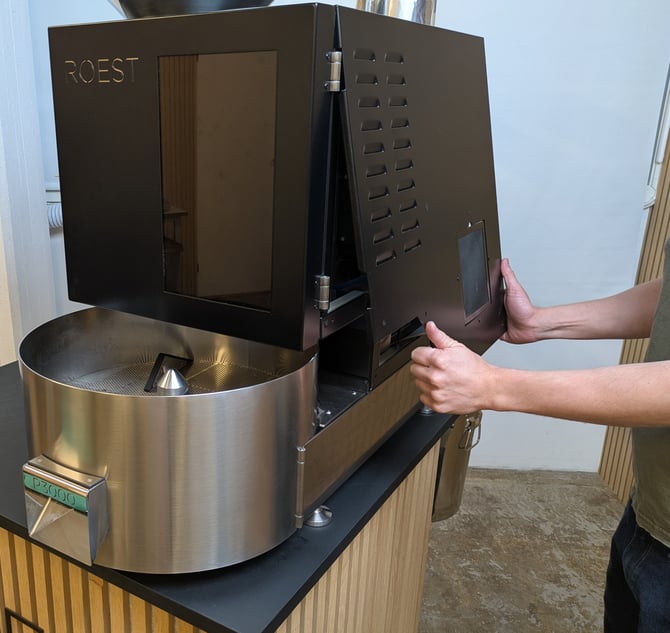
Loosen the main motor driver
The motor driver is attached to the frame with adhesive tape. Pull the driver firmly to the right to loosen it, and then set it carefully to one side.
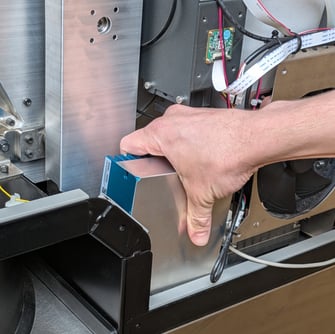
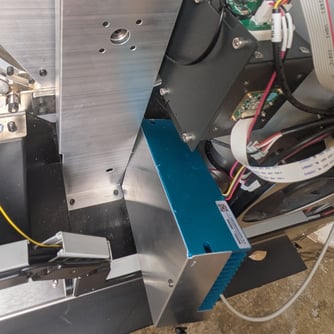
Remove the belt cover
Use a 3 mm hex key to remove the bolts securing the belt cover. Remove the belt cover and set aside.
Loosen the tensioner bracket
The tensioner bracket is held in position with two bolts. Use a 5 mm hex key to loosen the bolts, but do not remove them.
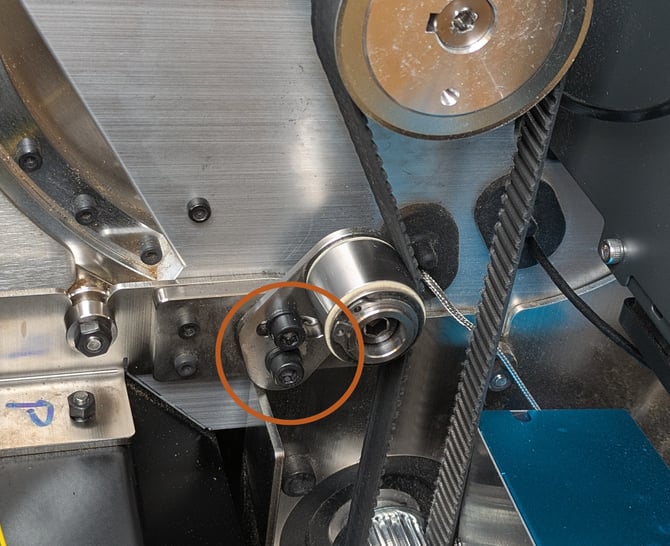
If you are only aligning the belt and not replacing it, then you should skip the following steps and go straight to 'Align the lower pulley', below.
Remove the belt
With the tensioner loose, you may be able to pull the belt off the pulleys directly. If this proves too difficult, you can also remove the pulleys by loosening the grub screw holding them in place.
Replace the belt and slide the pulleys back onto the shafts if you removed them. Push the large, top pulley as close to the drum as possible and then tighten the grub screw to hold it in place. Leave the grub screw on the lower pulley loose, so that you can position it to align the belt correctly.
Adjust the belt alignment
With the pulleys and belt in place, try to position the lower pulley so it lines up with the upper pulley. In the correct position, the lower pulley may protrude slightly from the end of the motor shaft.
A straight edge can help you get the correct alignment. Once the pulleys are in line, tighten the grub screw on the lower pulley to hold it in place. Check that the edge of the belt does not protrude beyond the end of the tensioner wheel. If it does, then position the lower pulley slightly closer to the drum as needed.
Adjust the belt tension
To tighten the belt, push the tensioner towards the belt. The belt should have some tension, but be loose enough that you can easily twist the free side of the belt by 90 degrees using your fingertips.
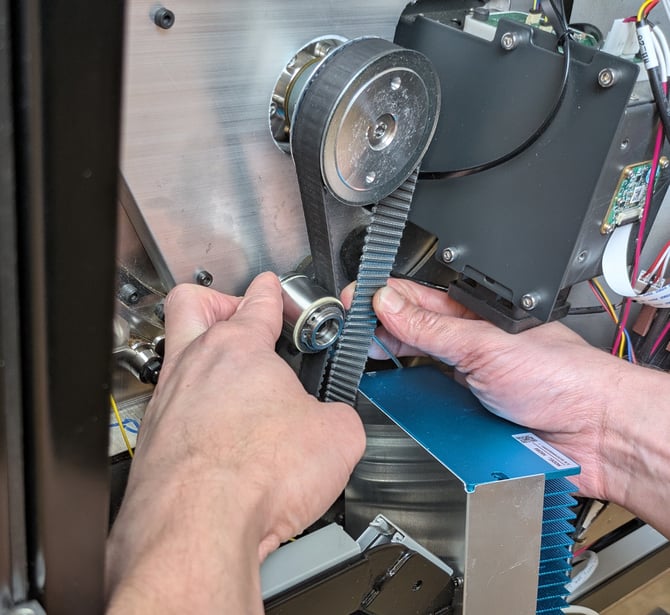
Once the tension in the belt is correct, tighten the bolts holding the tensioner bracket in place.
Double-check the tension and belt alignment after tightening the bolts and adjust if needed.
Finish up
Remount the belt cover using the three bolts.
Reposition the main motor driver and press into place until secured.
Replace the side panel and secure with the four bolts.
Close the front door.